
Francesc Sánchez


UX stands for User Experience, which refers to how a user feels while using a digital product or service—not just a website. In the case of a website, it’s about evaluating the level of satisfaction and ease of use for users who visit and interact with it. Jakob Nielsen is considered the father of usability, and in 2000 he published the book Designing Web Usability, where he outlined the 10 usability principles that should guide any website.
A UX audit or User Experience Audit involves analyzing a website objectively using empirical methods to evaluate how it performs from the perspective of its target audience. It identifies friction points that hinder conversions and proposes specific improvements. The key advantage of a UX audit is that it provides objective data rather than assumptions or gut feelings. It explains the reasons behind user difficulties and provides actionable design recommendations to enhance usability and improve conversion rates. These recommendations must always be implementable—otherwise, the audit has no real value.
A UX audit should help answer questions like:
A UX audit can be done internally by the company or outsourced to a specialized web design and UX agency. An in-house team will have deeper insight into the company’s clients and business goals, while an external team brings a fresh, unbiased perspective. As for timing, it’s ideal to run a UX audit when you suspect something isn’t working or when the site has been live for a reasonable amount of time. Of course, usability testing should be ongoing. It’s also highly recommended to combine a UX audit with an SEO audit.
It’s important to distinguish between usability testing and a UX audit. Usability tests focus on user behavior during navigation, which is just one part of a full UX audit. A proper UX audit goes further, aligning user behavior analysis with pre-defined business objectives, analytics data, and industry benchmarks.
A comprehensive UX audit should follow six sequential phases:
Before evaluating the website's design or functionality, it’s essential to understand the "why" behind it—its mission and primary/secondary goals. The best way to gather this information is through interviews with business leaders and product stakeholders. Goals must be clear, measurable, and achievable. It's not enough to say “increase sales” or “grow newsletter signups”—we need specifics like “increase sales by 20%” or “get 1,000 new subscribers.” Always validate these goals with the client to ensure alignment.
The next step is to understand who your users are. You’ll need to develop a user persona or profile that captures your ideal customer. Without this, it's impossible to design a suitable experience. Ideally, you should also conduct interviews with actual users of your product or service.
Once you know your users, define the typical paths they take through your site. These flows help identify where users are likely to encounter friction or obstacles that prevent them from completing key actions.
From a technical standpoint, various analytics tools can help assess the user experience on your site. The most popular is Google Analytics, which offers extensive quantitative data and supports A/B testing. Tools like Kissmetrics provide insights about specific (non-anonymous) users, while Hotjar and CrazyEgg allow screen recordings and heatmap analysis. Whichever tools you choose, make sure they’ve been collecting data long enough to identify reliable trends.

This is a core element of any UX audit. As a UX web designer, you should be familiar with usability heuristics that all websites should follow to ensure a successful user experience. The goal is to test the site as a user would. Go through the entire experience step by step, documenting any friction points or usability issues. Take notes, screenshots, and use checklists based on Nielsen’s 10 usability heuristics. You can use this UX checklist by David Travis of Userfocus.co.uk to help with the process.
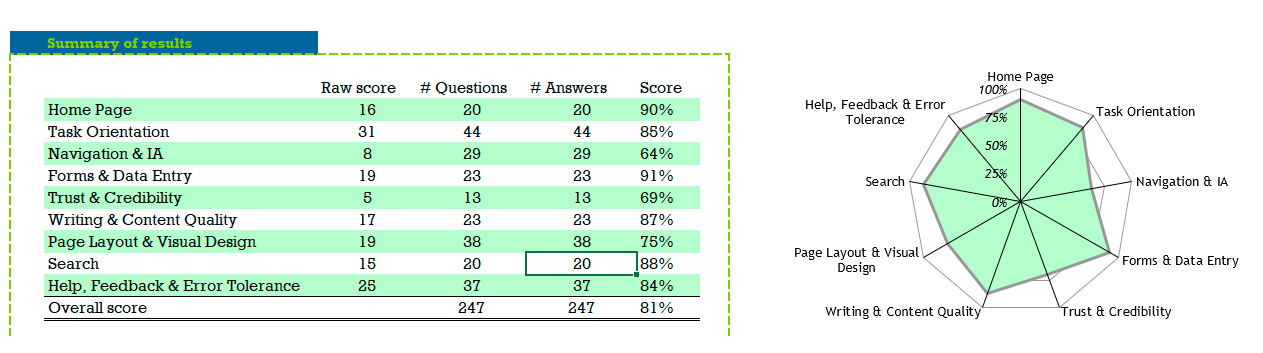
The UX audit should culminate in a set of findings and clear, feasible, and actionable recommendations to improve the user experience. These may involve changes to the design, structure, or functionality of the website. Include wireframes or prototypes to visually support your proposals. Remember: a UX audit’s goal is not just to point out flaws, but to offer real solutions.
Now that you know how to conduct a UX audit, here are the key takeaways:

Hello! drop us a line


A UX audit guides us through data, not hunches or assumptions