


28 / 03 / 2024
Unassigned in Analytics 4: how to fix it

Bruno Díaz
—Marketing Manager
SectorLet's talk about
Since Google Analytics 4 replaced Universal on July 1, 2023, many of us have noticed substantial changes in how data is collected. One of the most notable — or even somewhat questionable — changes has to do with acquisition channels. Yes, we are referring to all that traffic classified under the Unassigned channel.
If previously we explained how to exclude IPs in Analytics 4, now it’s time to resolve the doubts around what the Unassigned channel is in Analytics 4 and how to fix it. Here we tell you everything you need to know about the topic.
What is the Unassigned channel in Analytics 4?
In broad terms, we can define Unassigned as a new channel through which Analytics 4 classifies the traffic a website receives. In the same way we have the Organic channel to classify organic visits, or the Direct channel to group users who reach a domain directly, there is now a new default channel called Unassigned.
So, the question would be: what traffic is classified as Unassigned according to Analytics 4? Let’s understand this channel a bit better.
It groups all sessions or users who arrive on the website and whose origin Google Analytics is not able to identify. Therefore, Analytics 4 cannot assign these users a specific source or medium, and they are collected under this Unassigned channel.
Another important case in which sessions or users may be classified into the Unassigned channel is when the source / medium field in Google Analytics 4 displays (not set). This is the scenario shown below.
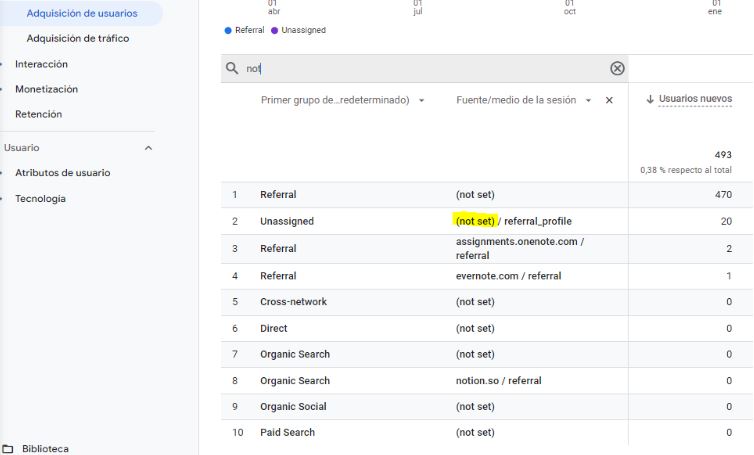
Why Unassigned traffic appears and how to fix it
Now that we know that the Unassigned channel in Analytics 4 gathers all users or sessions whose origin cannot be identified by the platform, let’s look at the situations in which this happens and how to solve it.
- Analytics 4 is incorrectly configured: the first step is ensuring the Analytics 4 setup has been implemented correctly. The recommended approach is to implement the tag via Tag Manager or gtag.js, placing the tracking code properly. It's important to check that when someone visits the site, the session_start event triggers, as it contains the attribution data. The Google documentation helps clarify this.
- UTM parameters: missing UTM parameters or incorrectly configured URLs used in campaigns. It is crucial that when using a link for a campaign that requires UTM parameters, they are applied following the correct order and logic established by Google. In the example below, a newsletter platform is not using the UTM URL correctly.
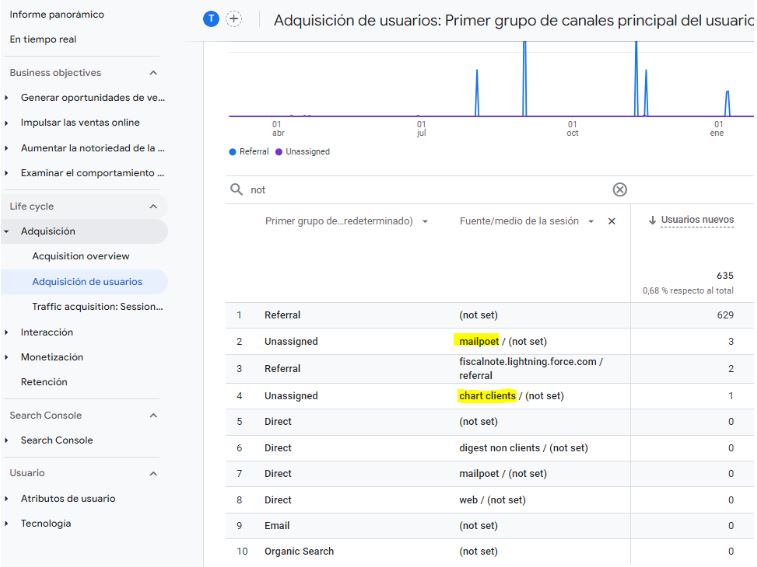
Other causes and solutions for Unassigned traffic
The causes and solutions described above are the main ones, especially those related to the improper use of URLs with UTM parameters. However, there are additional situations in which Analytics 4 may classify traffic under the Unassigned channel, with different solutions.
Other cases and solutions for Unassigned traffic:
- Consent Mode: this occurs when events are being sent to Analytics 4 but the user has not accepted cookies, preventing the platform from identifying their origin. You have two options: accept this portion of Unassigned traffic as a natural result of proper cookie management, or stop sending events to Analytics 4 when cookies are not accepted.
- Actions/events sent by a server or third-party systems involved in the journey: this happens when Google Analytics cannot determine the origin because the user’s information and the events associated with their activity have been lost along the way. An example is when a user completes a purchase on an e-commerce site and this information is sent first to a server before displaying the thank-you page. If the server cannot return the necessary information to the next page visited by the user, Analytics 4 loses the attribution data. In short, navigation flows involving external platforms can interrupt the user information passed to Analytics 4.
- Other cases: unpredictable behaviors, such as a user not accepting cookies initially and then accepting them later, or having a preloaded tab on their mobile and visiting the page without performing any identifiable action. These are situations in which defining an origin is difficult.
Eliminating Unassigned traffic in GA4 depends on each case
Since the introduction of Analytics 4 as the new version of Google Analytics, we have seen substantial changes in how user data is collected. Additionally, new European legal requirements regarding cookies have affected how websites gather data and information about their visitors.
As a result, the Unassigned channel in GA4 has become the place where Google Analytics groups all sessions or users whose origin cannot be identified. Whether due to UTM issues, Consent Mode, or the website failing to send information correctly, it is increasingly common to encounter this situation. We hope this has helped you better understand your case and identify the cause so that you don’t end up in Unassigned too!
About the author
Bruno Díaz — Marketing Manager
Professional with a long career as a communication and digital marketing consultant, specializing in SEO, SEM and web projects. As Marketing Manager of the agency, I coordinate a great team of digital marketing technicians of which I am very proud.
Related news


Hello! drop us a line
In Unassigned in GA4, web sessions with no clear source are classified.