


21 / 03 / 2024
Sitemaps and SEO, advanced level

Bruno Díaz
—Marketing Manager
SectorLet's talk about
Sitemaps are very useful tools to influence the crawling and indexing process of our website. In this post we will learn how to configure them, how to make the most of them, and some advanced tips if you want to take them a bit further beyond their usual functions.
Everything about Sitemaps
Definition of sitemaps
We can define sitemaps as files created with information about the pages contained in a website, as well as their relationships. Search engines like Google or Bing use them to crawl websites more efficiently: instead of browsing our site by following internal links, they consult the list where we are supposed to include the pages intended to be indexed. In English we call it a sitemap, but be careful not to confuse it with an HTML page usually linked from the footer, designed to help users navigate large websites (nowadays rarely used).
What to include in sitemaps (and what not)
Some of the following may sound obvious, yet it’s surprising how many sitemaps fail to meet these principles. Essentially, we must include in our sitemaps the URLs we want to rank—those we consider valuable. We should ensure that all these pages are accessible and not considered thin content or duplicate content.
In addition to providing a list of URLs, it is recommended to include optional elements such as:
- The last modification date of each URL, using the lastmod tag
- Hreflang relationships between URLs (to specify equivalent content in different languages)
- The main images present on each URL (or all images)
What are sitemaps used for?
Although at first glance it might seem that the sole purpose of sitemaps is to send URLs for indexing, SEOs use them for several important tasks. These are the main ones:
- Launching a new website: sitemaps play a key role in helping Google discover and index new URLs more efficiently.
- Website migrations: they speed up the replacement process in search results. We can submit one sitemap containing the new URLs (HTTP 200), and another containing the old URLs (HTTP 301).
- Mass URL removal: useful when removing large amounts of content or if the site has suffered an attack generating thousands of spam URLs. These sitemaps are usually submitted with 404 or even 410 responses.
- Segmented indexing analysis: by splitting sitemaps by date, file type or language, we can analyse indexing and ranking at a segment level.
TIP: to create sitemaps manually, Screaming Frog is a great tool.
Sitemap formats
Google’s documentation is clear and generous. It accepts and processes sitemaps in three formats:
- XML: the most used and recommended
- RSS: a bit old-fashioned, originally used to follow blogs
- TXT: acceptable, but extremely limited in capabilities
So don’t complicate things—use XML unless your project’s legacy system makes it impossible.
Requirements of a good sitemap
Here is a list of key requirements for a first-class sitemap:
- URLs must be absolute, not relative (protocol + domain + slug)
- The sitemap file must be stored in the website root
- URLs must be clean and user-friendly, without parameters
- It should use UTF-8 encoding
- Must not exceed 50,000 URLs or 50MB in size. For large sites, divide sitemaps by language or type
- All URLs must return HTTP 200
- The sitemap should update automatically
- The file must have a clear and unambiguous name, located in the root
- It is recommended to indicate sitemap locations in robots.txt
- All URLs must have a self-referencing canonical
How to create a sitemap
- Through custom development, generating a sitemap adapted to the project’s needs
- Using online tools like XML Sitemaps Generator or Screaming Frog, although these are static and not recommended long-term
- With WordPress via complete SEO plugins like Yoast or Rank Math (see our Rank Math guide)
How to organize sitemaps
Generally, it is advisable not to have a single sitemap but several, depending on the project’s structure, SEO priorities and desired segmentation:
- By language
- Image sitemap if image SEO is a priority
- PDF sitemap for sites with many catalogues, manuals or documents
- Video sitemap if video content is significant
- Google News sitemap for news publishers (includes articles from the last 48 hours)
- By page type: posts, product pages, listings, services, etc.
- By date for blogs or media sites
Examples of sitemaps
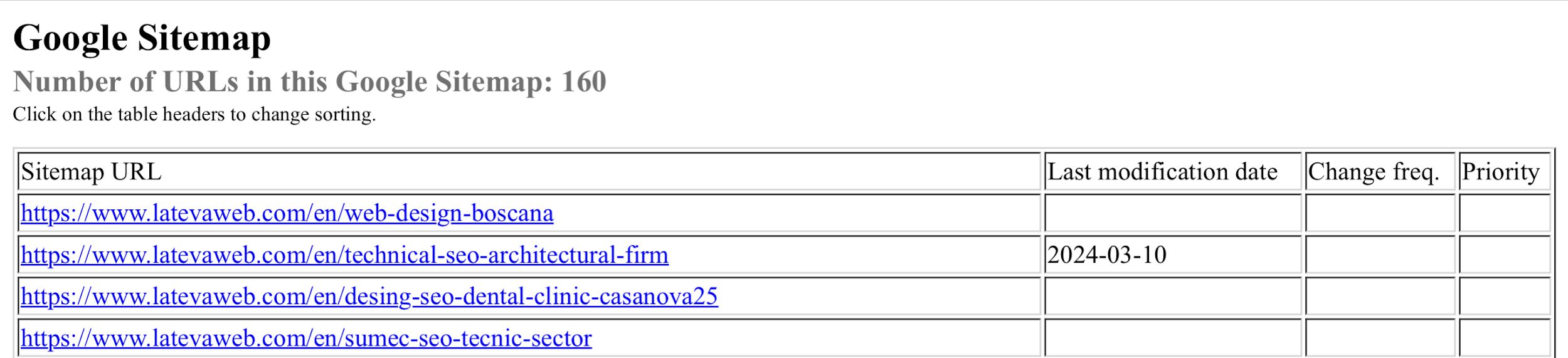
Here we share something quite personal, although no secret: the Latevaweb sitemap.
We have chosen to use three sitemap indexes, one per language. The default ES version is at: https://www.latevaweb.com/sitemap.xml
The Catalan and English versions are at: https://www.latevaweb.com/ca/sitemap.xml https://www.latevaweb.com/en/sitemap.xml
Inside each index, you’ll find sitemaps by page type:

And each sitemap includes the Lastmod attribute to indicate the last content update date:
Checklist to validate Sitemaps
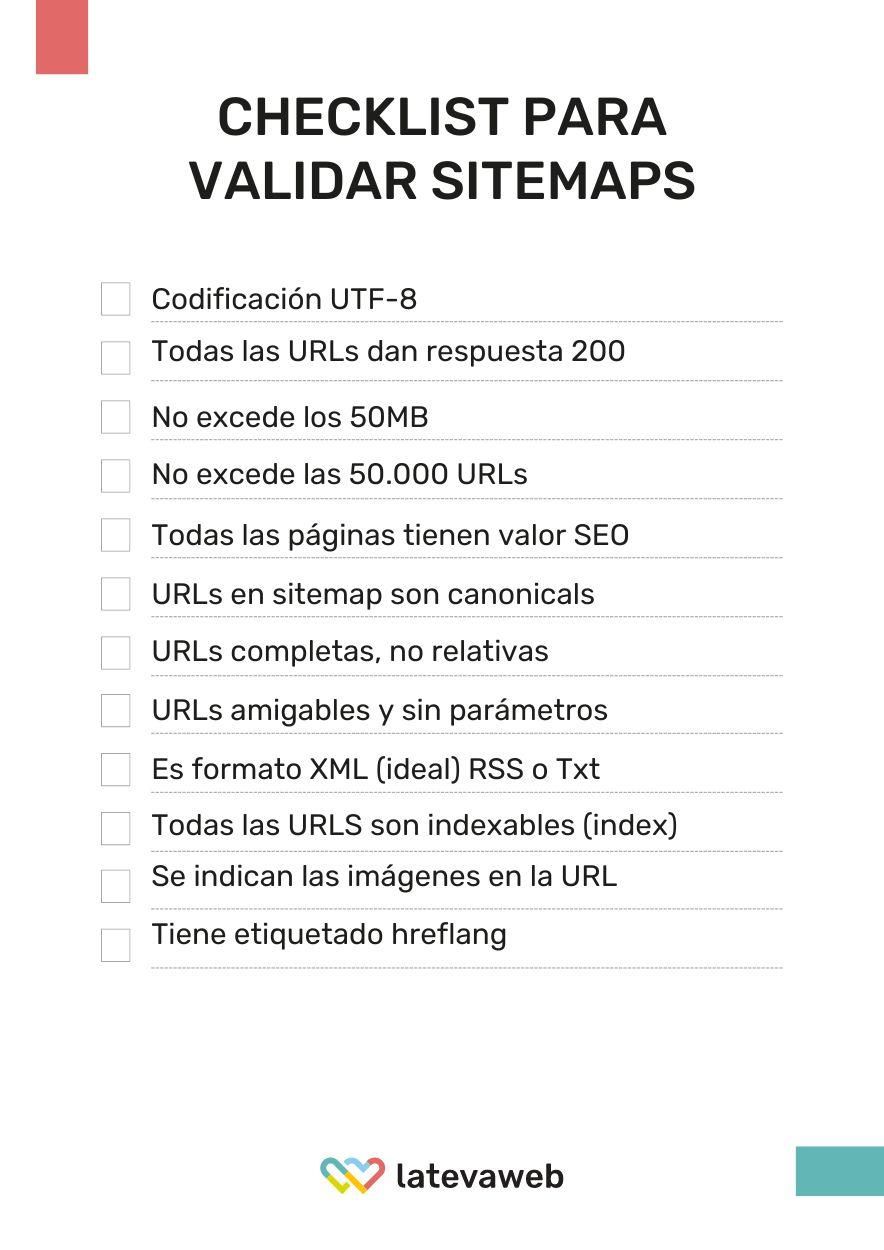
Below is a checklist with all the elements you should review before submitting a sitemap to Google. Internalizing these points is part of what distinguishes an experienced SEO from a beginner:
Frequently asked questions about Sitemaps
Does the order of URLs in a sitemap matter?
No. The order is irrelevant. What matters are creation and modification dates, not the ordering.
How many images can I reference in a sitemap?
A standard HTML sitemap usually references the main image of each URL, but you can include up to 1,000 images per URL. If image SEO is important, take advantage of this.
Does every website need a sitemap?
Not necessarily. Small websites with good internal linking and proper canonicals shouldn’t have issues with Google discovering their important URLs. For large websites, however, it is essential to optimize crawl budget.
Still, having a sitemap is generally recommended for any site. It is especially useful for new websites or those containing many non-HTML files.
How can I know if my sitemap is valid?
When submitting a sitemap to Search Console, Google indicates whether it has been accessed and processed. Screaming Frog also helps check detected vs sitemap URLs, non-indexable sitemap URLs, and indexable URLs missing from the sitemap. Online tools such as Validate XML Sitemap are also useful.
Can I specify URL priority and crawl frequency?
You can indicate them using priority and frequency, but Google no longer uses these parameters and will ignore them.
Will Google index all the content in my Sitemap?
There is no guarantee. Google will crawl the sitemap, but indexing depends on content quality and originality. Sitemaps are a suggestion, not a directive. Google may also index URLs not included in the sitemap if it can access them. To avoid this, you must block them via robots or use noindex.
About the author
Bruno Díaz — Marketing Manager
Professional with a long career as a communication and digital marketing consultant, specializing in SEO, SEM and web projects. As Marketing Manager of the agency, I coordinate a great team of digital marketing technicians of which I am very proud.
Related news

Hello! drop us a line
In this post we will learn how to set up sitemaps, how to make the most of them, and some advanced tips.