


22 / 04 / 2026
Common issues and solutions in Google Search Console

Bruno Díaz
—Marketing Manager
SectorLet's talk about
If you manage the SEO of a website, sooner or later Google Search Console will give you more than one displeasure. Alerts that you don't know how to interpret, pages that don't appear in the index for no apparent reason, traffic drops that arrive on a Monday morning... At La Teva Web we have been auditing web projects for years and we can assure you that most of these problems have a solution. So let's check them out!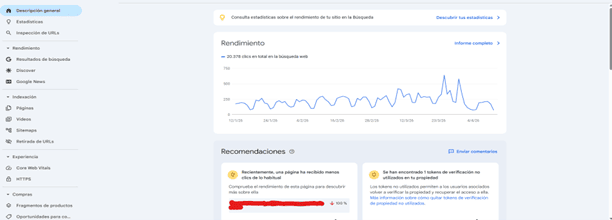
Table of Contents
Pages Google Doesn't Index (And Why)
The Coverage report is the first one we look at when we audit a new site. Within the "Excluded" section you can find several different reasons, and not all of them have the same severity.
The most common is the noindex tag. Sometimes it is triggered unintentionally from the CMS or from an SEO plugin, especially after an update. Always check that important pages don't have it.
Another common reason is the robots.txt block. We have seen websites where, after a migration, the entire /product/ folder had been locked. Google can't track what it can't read, so make sure the robots.txt file isn't closing doors that should be open.
Finally, the case of "URL crawled, but not indexed" is the most sensitive. Here Google is telling us that it has visited the page, but has decided not to include it. Normally, it points to content problems: pages that are too short, without differential value or too similar to others of the same domain.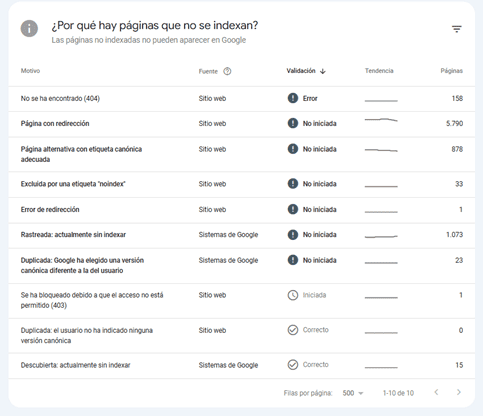
404 errors and misconfigured redirects
404s are inevitable on any website with a certain history, especially if you have made URL changes or removed products. The problem is not having them, but not managing them.
The first thing is to identify where the broken link is coming from: is it an internal link, an external link or a sitemap entry? Depending on the source, the remediation priority changes. An authoritative external link pointing to a 404 is lost authority, and that hurts in positioning.
The solution is to apply 301 redirects to the most relevant URL. And remember to update the sitemap: if you continue to include URLs that no longer exist, you are wasting crawl budget.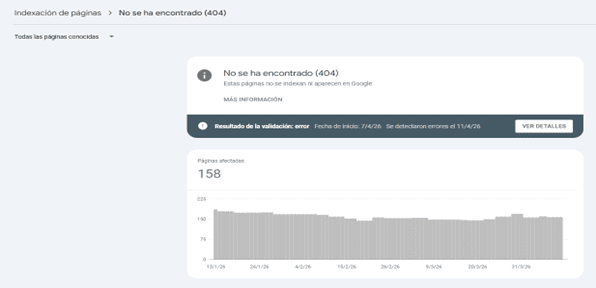
Mobile usability: small mistakes with big impact
Since Google has implemented mobile-first indexing, mobile usability issues are no longer "something to improve in the future." They affect positioning now.
The most common warnings we see in GSC are text that is too small (below 16px), touch elements that are too close together, and content that exceeds the width of the screen. The latter usually comes from images or tables without max-width: 100% in the CSS. These are quick fixes that often have a visible impact within a few weeks.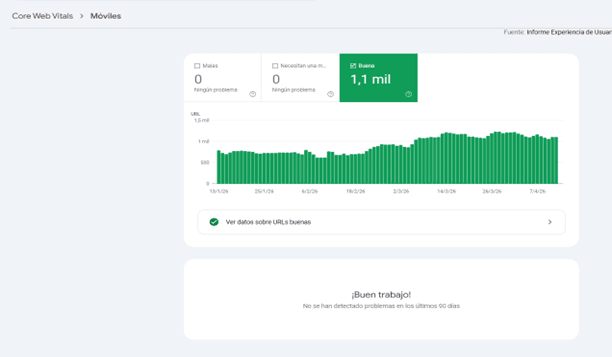
Mobile" report. It shows a green bar chart indicating that there are 1.1K URLs considered "Good", with no URLs having errors or needing improvement, accompanied by the message "Good job!".
Structured data: when the schema is not well implemented
The GSC Improvements report will show you errors in the schema markup if you have rich snippets implemented. Missing mandatory fields are the number one cause of errors: a product without a price, a rating without ratingCount... Before publishing any changes to the schema, always validate them with Google's Rich Results Validator. It will save you time and you will avoid penalties.
Performance drops: how to interpret data without losing your mind
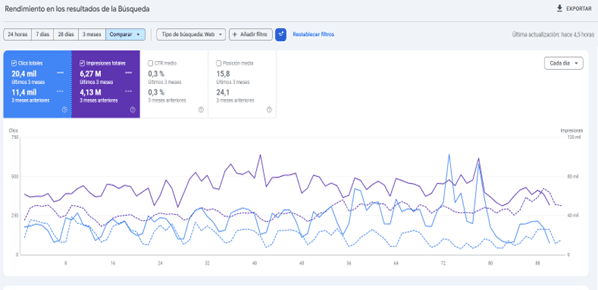
A drop in the Performance report does not necessarily mean a serious problem, but you have to know how to read it well. The first thing we do is filter by device and by country: if the drop is only on mobile or only in a specific market, the diagnosis changes completely.
Then we compare equivalent periods, never week to week if the sector has seasonality. And most importantly: we cross-reference the data with the website's changelog. CMS updates, template changes, modifications to the URL structure... In 80% of cases, the cause of a fall is there.
In short, Google Search Console is not just an alert tool. Well used, it is a very valuable source of technical information to make SEO decisions with criteria. If you have doubts about how to interpret any of these reports or need help with the technical audit of your website, you know where to find us.
About the author
Bruno Díaz — Marketing Manager
Professional with a long career as a communication and digital marketing consultant, specializing in SEO, SEM and web projects. As Marketing Manager of the agency, I coordinate a great team of digital marketing technicians of which I am very proud.
Related news

Hello! drop us a line
Discover how to identify and fix the most common errors in Google Search Console, from indexing issues and 404 errors to mobile usability and structured data faults.