
Francesc Sánchez


Keyword cannibalization happens when two or more pages on the same website compete for the same search and Google doesn't know which one to show. The most visible effects are rankings that go up and down, the wrong URL taking the top spot, and authority spread across pages. It is detected with Google Search Console, Ahrefs or a spreadsheet, and fixed by merging content, redirecting with a 301, differentiating search intent or adjusting canonicals and internal links. And sometimes the best decision is to do nothing.
We talk about cannibalization when two or more URLs on the same domain rank for the same keyword, or for a group of keywords that share search intent. Google has to choose which page to show, and that choice doesn't always match the page you would want to receive the visit.
The name comes from classic marketing, where a new product "eats" the sales of another one from the same brand. In SEO the same thing happens with pages: they eat each other's authority, clicks and impressions.
It is almost never a deliberate decision. It is usually the result of how a website grows over the years:
When two pages compete for the same intent, the usual effects are four: links and internal anchors are split between two URLs instead of strengthening one, the query's average position fluctuates because Google alternates the page it shows, the click goes to a less suitable URL (an informational article instead of a service page, for example) and results analysis becomes confusing because the traffic is divided.
No. Two pages on your website appearing for the same query is not, by itself, an error. John Mueller of Google explained it in September 2025 in an answer covered by Search Engine Journal: seeing several pages from the same site in a result is not problematic just because there is "more than one". What should be reduced is unnecessary duplication.
Mueller also pointed out that the "cannibalization" label often hides more concrete, real problems: unfocused pages, insufficient internal linking, thin content (thin content) or near-total duplication. The useful question, then, is not "are there two URLs?", but "do they compete for the same intent and are they hurting each other?".
There is another nuance: since June 2019, Google introduced a site diversity change whereby, in general, it does not show more than two results from the same domain in the top positions, with exceptions depending on the query, as reported by Search Engine Journal. Having two of your pages in positions 1 and 2 can even be good news. It is what some professionals call "positive cannibalization".
These are the most common situations and what to do in each:
Detection has two steps: first find the queries for which more than one URL is shown, then assess whether that coexistence is hurting you. The first is mechanical; the second requires judgment. These are the methods, from simplest to most scalable.
It is the most reliable source, because it shows which URLs your website was actually shown with on Google. Follow these steps in the Search Console Performance report:
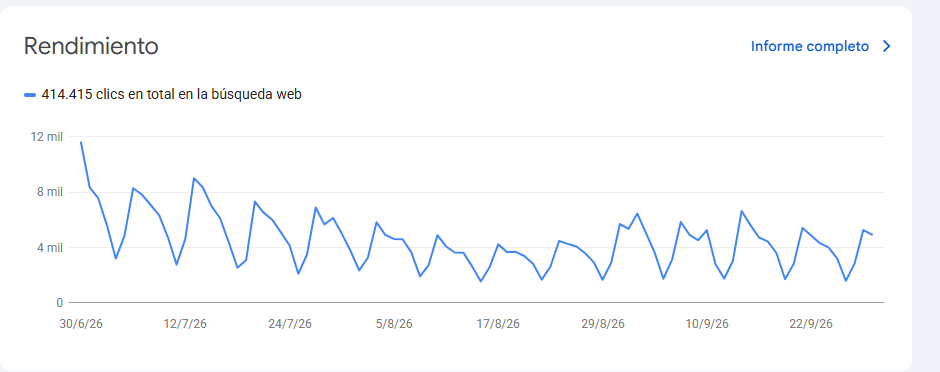


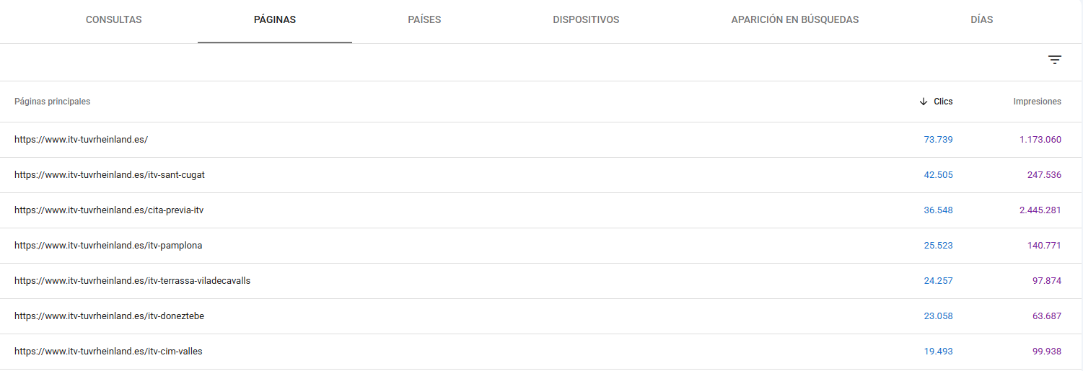
If you already have problems with your Search Console data, our guide to Google Search Console problems and solutions can save you time.
Ahrefs lets you see which URL each keyword ranks with and how it has changed over time. In Site Explorer > Organic keywords you can search for your keyword and check whether the ranking URL changes from one period to another, which is one of the clearest signals. If you have connected Search Console to your project, you can cross-check it with real click data. You can find the tool's full walkthrough in our Ahrefs guide and tutorial.
When the website has hundreds of pages, you need to automate it. The procedure is the same in Excel and Google Sheets:
For a quick check before publishing a new article, search Google for site:latevaweb.com "keyword". It is not exact, but it shows which pages you already have on the topic. For technical reviews, Screaming Frog detects duplicate or near-duplicate titles, H1s and content, and tools such as DinoRANK sync Search Console and Google Analytics to list cannibalization issues with one click.
Before touching anything, analyze both URLs using four criteria: content and intent (do they answer the same question?), authority (backlinks and internal links they receive), traffic (real clicks) and conversions. The page with the best results will be the winner, and the other decisions are made based on it.
It is the most common solution when two pages answer the same intent. The best URL is kept, the useful content from the other is moved into it and the leftover one is redirected. Follow this order:
Avoid redirect chains (A → B → C): each hop adds latency and can reduce effectiveness.
If both pages make sense on their own, there is no need to remove either: they just need to stop competing. Rewrite the title, the H1 and the headings so that each page has one main keyword and a different intent. An informational guide can work on "what is", "how to" and "examples"; a service page, "agency", "price" and "hire". Our guide to search intent explains how to classify them, and the one on SEO headings how to structure them.
Make all the anchors that use the main keyword point to the page you want to rank. From the secondary page, add a contextual link to the main one. This gesture, although simple, is what most often solves mild cannibalization. You can dig deeper with our article on internal linking for online stores.
Useful when you need to keep both URLs accessible but the content is practically the same: product filters, tracking parameters or printable versions. With rel="canonical" you indicate which is the preferred version. Keep in mind that, according to Google's documentation, it is a hint and not a directive: Google may choose another URL if the signals suggest it. And it doesn't work when the content of the pages is genuinely different.
If the URL has no traffic, no backlinks and no function for the user (an old tag, an empty archive), the cleanest solution is to remove it or add noindex. If it has backlinks, redirect it instead of removing it, so that authority is not lost.
The following two examples are illustrative; the figures are hypothetical and only serve to show the reasoning.
A website has two posts, "What is thin content" and "How to detect poor content", that alternate between positions 6 and 11 for the same query. They answer the same intent, neither receives notable traffic and both have few links. Decision: merge them into one, redirect the old one with a 301 and strengthen the new one with internal links.
An agency has the page "SEO audit" and an article "How to do an SEO audit step by step". Both appear for "seo audit", but one user wants to hire and the other to learn. Decision: do not merge. Fine-tune the article's title so that it is clearly informational, link it to the service page and check that the commercial page is the one that appears for searches with purchase intent.
Fixing is expensive; preventing is almost free. Four habits greatly reduce the problem:
It is when two or more pages on the same website compete for the same keyword or search intent, and Google doesn't know which one to show. This can make rankings fluctuate and spread authority across the URLs.
There is no penalty for this reason. What happens is that signals (links, clicks, relevance) get diluted and Google may show the least suitable page.
Filter a query in the Performance report and look at the Pages tab. If two or more URLs have relevant impressions and alternate positions, cannibalization is likely.
A 301 when you want one of the pages to disappear and its value to pass to the other. A canonical when both must remain accessible but are almost the same.
Yes. If two of your pages occupy the top positions for the same query, you get more visibility. It is worth watching that they are not hurting each other, but it doesn't always need fixing. The Spanish search "canibalización seo positiva" already registers around 90 monthly searches in Spain, according to Ahrefs data.
Keyword cannibalization is not a disease that must be eliminated at any cost, but a clue: it indicates that two pages have a poorly defined relationship. Detect it with Search Console data, decide using the four criteria (content, authority, traffic and conversions) and choose the smallest action that solves the problem. If you want a team to review it on your website, our professional SEO audit includes this analysis, and you can see how we work on SEO positioning in Barcelona. You can also write to us directly.

Hello! drop us a line


Are two of your pages competing for the same search? Learn to spot it with Search Console and Ahrefs and decide when to fix it and when not to. Step by step.