Let’s remember that one of the key processes in SEO is crawling. In this process, Google sends its robots to analyse the content of our website. Log analysis is therefore relevant, as it allows us to understand which Google bots visit our site, how often, which files or pages they request, and what response they are getting from us. Through these requests, they detect new URLs or modified content on pages that were already in their index. In addition, every website has a limited crawl frequency and volume (crawl budget), so it is very important for us to understand which files it visits and what it finds when it crawls them.
In this post you will find:
1. What are logs?
A conceptual definition would be “an official record of events during a particular time range that is used to record data or information about who, what, when, where and why an event occurs” (
see wiki). In our case, they are the
records of visits by robots such as Google’s to files on our web server. These records generate a text file of all those requests, which we will then extract for analysis. In the log files there are requests from many agents, including users, but our intention will be to obtain only those that are of interest for SEO.
Anatomy of a log entry
- IP: internet address of the user making the request
- Date: exact time of the request and its time zone
- Request type (GET, POST)
- URI: the requested resource
- Protocol: HTTP1, 2 or 3
- Response code returned by the server: 200, 3XX, 4XX and 5XX…
- File size (weight)
- User agent: which user it is and with which browser the request is made
In short, we see who is requesting what, at what time, how much it weighs and what our server has returned.
This log format is the most common one for an Apache server, but if you use another type of hosting it is possible that the files differ slightly in their structure.
How to obtain log records
Any decent hosting with PLESK, CPANEL or similar systems should offer you the option to download these files. If it does not, ask your hosting provider for them and at the same time start thinking about
changing server. An alternative, if you have FTP access, is to check the /logs/ folder from there.
2. Tools for log analysis
Crawl stats in Google Search Console
The first approach to log analysis for any SEO should be this section of Search Console, which we have already looked at in our
Search Console guide.
Some interesting information you can obtain includes:
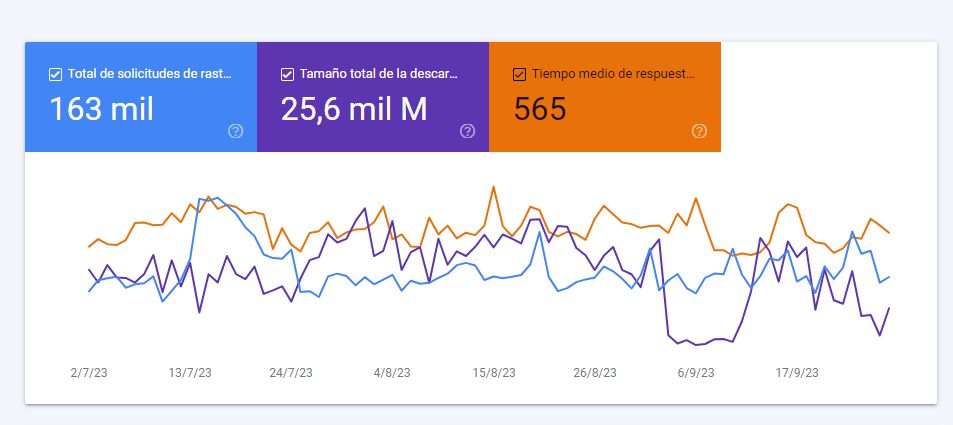
- Total crawl requests (note that it only takes into account the robot that most frequently visits your website, usually the smartphone bot)
- Total download size
- Average server response time to the request
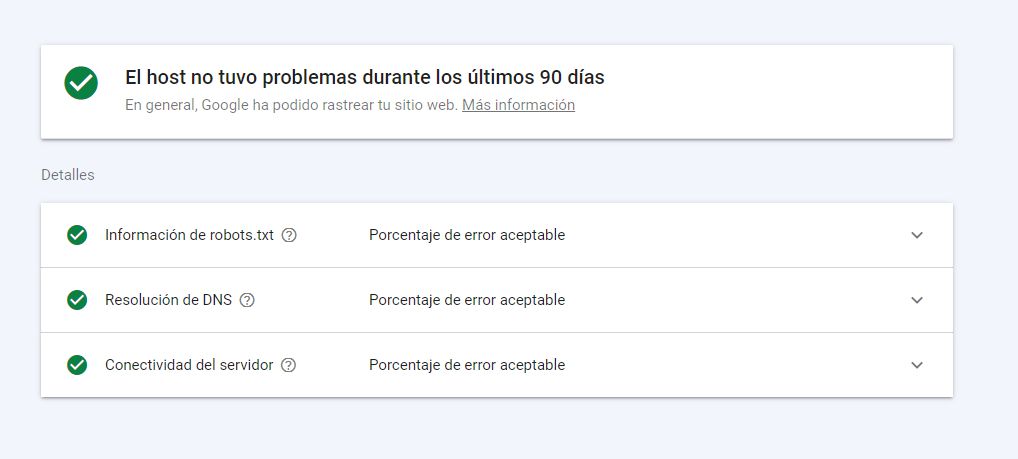
The host status is something that in 99% of cases will be fine, but if it is not, we are facing a serious situation: Google has not been able to access our website on more than one occasion, and we will need to take action. There is always a margin of error, but we should never exceed the error threshold that is considered acceptable.
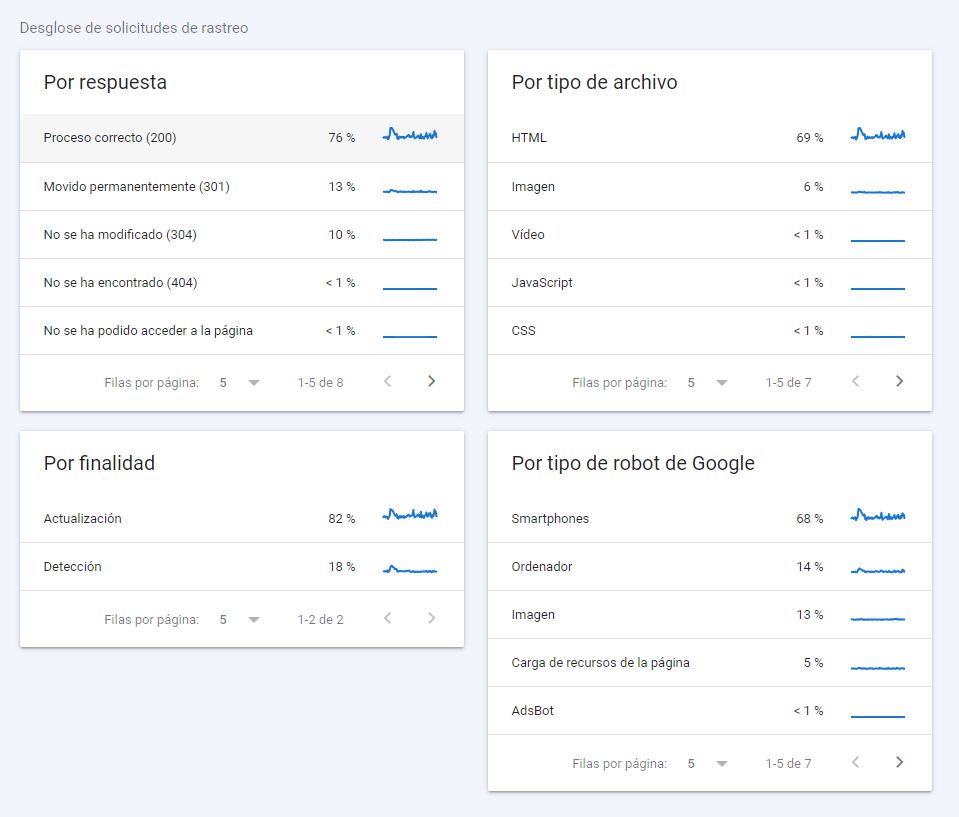
In the crawl request breakdown we have very relevant information:
- What server response we are delivering (the more 200s, the better)
- By purpose (refresh or discovery): this will depend on the size of our website and our frequency of publishing and updating content
- By file type: ideally, since we are delivering web pages, the vast majority should be HTML. Although this will not be the case with JS-based technologies, where you should analyse the rendering processes in detail
- By robot type: the type of content and the typical devices your users employ often condition these figures
Without a doubt, the basic information for log analysis can already be obtained through the crawl stats section of Google Search Console.
For small websites this should be enough to give you an idea of what is happening between Google’s bots and your site.
Screaming Frog Log Analyzer
But for large websites, it is highly recommended to monitor logs, and in that case Search Console falls very short, as it provides limited data, not easily manipulated and only for the last 90 days. If you are in this second scenario, then you need dedicated log analysis software that allows you to carry out an in-depth analysis and subsequent
monitoring of crawling.
There are several tools on the market, but in terms of value for money we definitely recommend trying
Screaming Frog Log Analyzer. If you are familiar with Screaming Frog, its best-known version simulates how Google’s bots might crawl our site. But with SFLA what we do is an efficient analysis of the logs that have actually been generated.
Carrying out a log analysis with SFLA
In the first section we defined how to obtain a log file. Now we have this beauty with us, do not panic:

Once we have this file, the goal will be to
filter it to obtain only the logs we are interested in. We could do this process manually, but we do not recommend it. In this example we are going to use Screaming Frog Log Analyzer. We will use the free version, which takes a sample of up to 1,000 lines. We upload the file and get something like this:
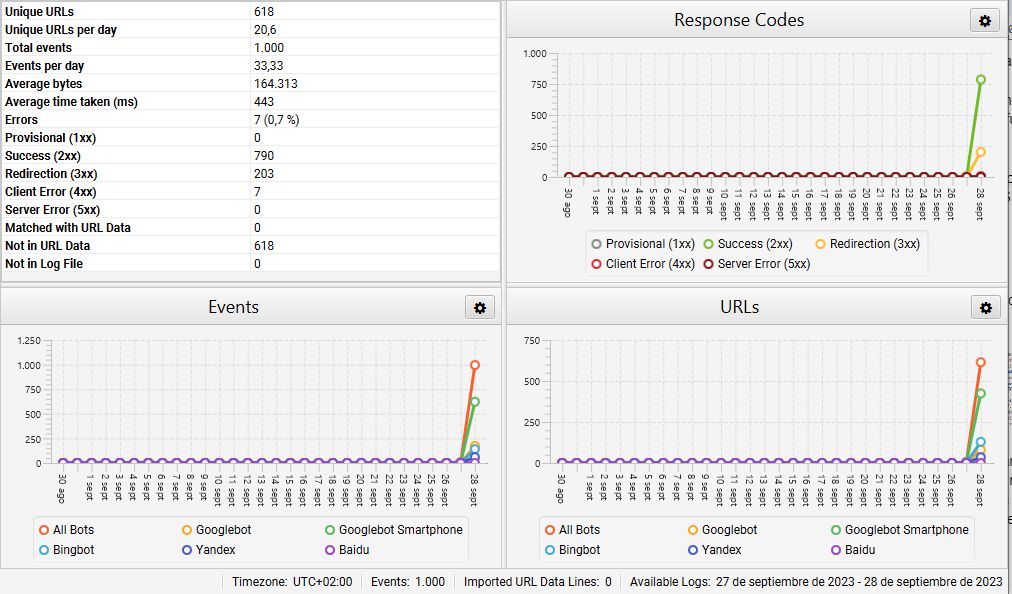
At first glance we can see that of the 1,000 records, the vast majority are from Googlebot Smartphone and Googlebot (80% together), but be careful, there are also visits from Bing, Yandex and Baidu bots. We also get an initial overview of which response codes we are returning. This project is very well worked, and it is no coincidence that it returns a 200 response in 80% of cases, 3XX redirects in 20%, and no 4XX or 5XX responses, which are the most harmful.
But if we want to focus on Google, the tool allows us to filter the data to show only visits from Google bots, or even from just one of them:
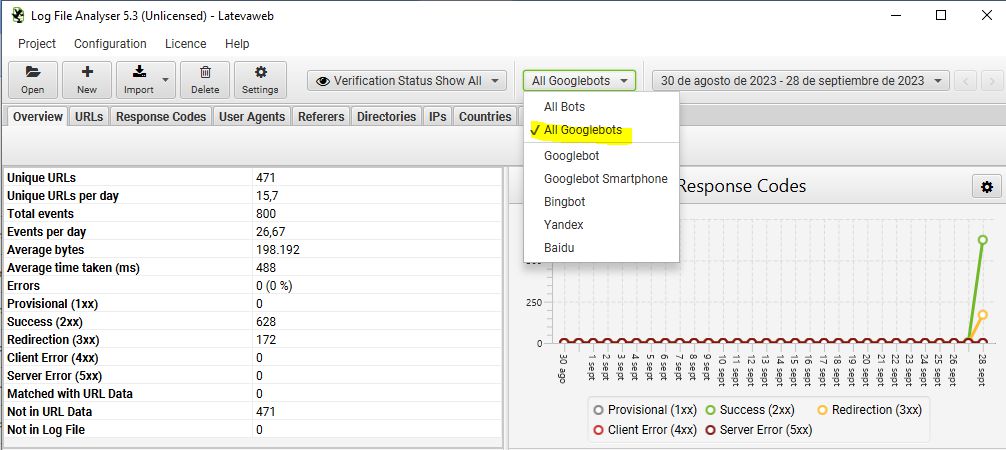
In addition to the general
overview with global log data, it offers several tabs to analyse the data in different slices. In the end the information is the same, but grouped by different parameters:
- URLs: the pages visited by the bot, how many times they have been visited, the last response code obtained or the file size, among others
- Response codes: events ordered by response codes
- User agents
- Referrers: allows us to see which source led Google to discover a given resource. They can be internal URLs, but also external websites
- Directories: grouping of the visited content according to the folders in our hosting
- IPs: we recommend that when creating the project you tick the box to verify only real Googlebot visits and not simulated ones. In that case, all IPs will belong to Google (they should start with 66.249).
- Countries
- Events: normally you will prefer to see events grouped by URL, but here you have them all
- Importing external data: this is useful if we want to upload other data, for example a crawl from the Screaming Frog spider, to cross-check and compare it with Google’s actual crawl. This can help you find orphan URLs, for instance.
Once we have this data, it is worth analysing it and trying to draw conclusions. There are entire tables that may be useful and we can export them. Some suggestions would be:
- Export data by URLs, sort them by number of visits and thus cross-check what Google visits with what we want it to visit
- Export the response code table to isolate 4XX, 5XX or even 3XX codes
- Export inconsistent URLs. It is better to avoid those from Googlebot Images, as they often return 304 (not modified), which are not a problem. An inconsistent URL returns different results in different logs, so we may be facing issues on our server or in our code
3. Log records and SEO
Which logs should SEOs look at?
If you are performing log analysis to study aspects related to SEO, then you should essentially focus on the logs from Google’s crawl bots: mainly Googlebot Smartphone, Googlebot Desktop and Googlebot Images, although Google is increasingly diversifying the bots it uses for its index.
Through log analysis we can find out which robots visit our site, which URLs they visit and how often they crawl each URL, among other interesting information.
Relevant information to extract for SEO in a log analysis
- Events per day and their distribution
- Crawl errors
- Orphan URLs
- Which parts of the site and which types of URLs are crawled most often
We will then process this information and match it with our business priorities. Imagine that we manage SEO for an online shop whose main objective is to sell products online, but we detect that the bots often visit blog pages and almost never category or product pages. We are facing a business problem that we need to address (see post
From SEO in bulk to business-oriented SEO).
In the end,
the important thing is to identify how many irrelevant URLs are being crawled and how many relevant URLs are not being crawled enough. Our first goal as SEOs will be to achieve an efficient distribution of our crawl budget. Let us not forget that the crawling process comes before indexation and subsequent ranking.
When to carry out a log analysis and monitor it
Earlier we explained that for a small website it is not necessary to run a log analysis like the ones described in this post. It is hard to set a specific number or size, but we would dare to say that
for websites with fewer than 10,000 URLs, Search Console is more than enough. Beyond that, it is a good idea to carry out a log analysis when you start the project and from time to time. For especially large projects, in addition to running an initial analysis, you should set up a monitoring protocol with established routines and frequency, although this will depend on the resources available.
Log analysis and crawl budget
Think of the amount of resources Google must invest to crawl millions of web pages every day. Its resources are not unlimited, so it assigns a specific time and download size to each website. So if it has 30 seconds to crawl 5,000 resources on our site, it will try to make the most of that time to obtain valuable content.
Logs will tell us whether Google is spending that time requesting our relevant content or not, and the real challenge lies in our ability to analyse and make decisions to influence this.
As a result, some measures you can take are:
- Identify and remove duplicate content
- Identify and remove thin content URLs
- Review noindex pages. Remember that Google is not going to waste time crawling those URLs. Do you really need them?
- WPO optimisation so that with better performance on our site, Google can request more URLs in less time
- Identify 4XX and 3XX responses and, where possible, fix them and achieve the highest possible number of 200 responses
- Whenever the technology allows it, avoid generating and linking to non-canonical URLs (for example, with parameters)
- Review sitemaps: they should contain everything we want to index, and only that
- Use the robots.txt file to block bot access to certain content


Analyzing which files Google’s bots access on our website is an essential SEO practice for large projects.