
Francesc Sánchez


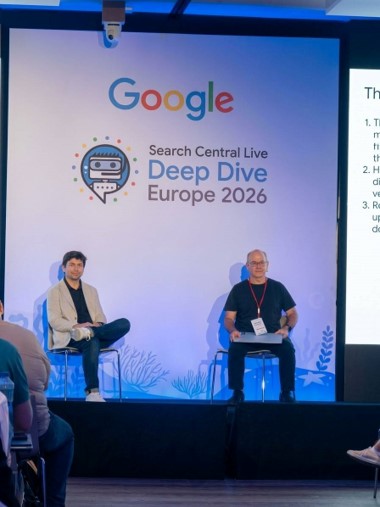
Google invited us to Search Central Live Deep Dive Europe 2026, the congress it organizes for SEO professionals and which this year was held in Barcelona. The first day was dedicated to how Google crawls the web. The second, to how it interprets it and decides what to store in the index. This article covers that second day, organized with a common thread: understanding how Google processes the content of our website to know what to do to get it indexed.
It is the most technical format of Search Central Live: long sessions with the Google Search team and space to ask questions. For an agency that works with SEO and development, it is an opportunity to hear first-hand how their systems work and contrast it with what we see every day in client projects.
Indexing is no longer a formality. Google only saves a small part of what it finds, and the context has changed: there are more and more websites and applications built with JavaScript, many already generated with AI; the results page incorporates summaries and modules that make not everything a blue link (we deal with it in SEO in 2026), and AI assistants read the website with different capabilities than Google. If the page does not reach the index well, the rest of the SEO work is useless.
The article follows the journey a page takes from when Google finds it to when it decides whether to save it. At each step, we explain what Google does, where websites tend to fail, and what should be checked. These are our lecture notes, not official Google documentation: for the fine details, Search Central documentation is still the reference. If any concepts don't ring a bell, our SEO Dictionary lists them.
From when Google finds a URL until it decides to save it, there are six steps:
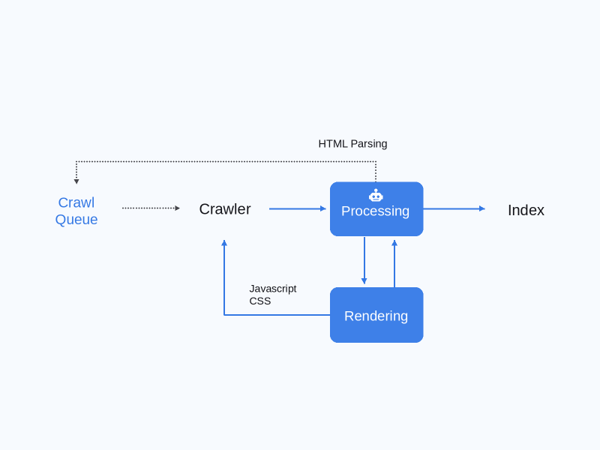
A problem in one step conditions the next. A page that Google cannot render will not arrive well interpreted in deduplication, or in signals, or in the index. That is why the most useful thing is to know in which step each page is lost.
Google doesn't crawl the entire web or always at the same rate. What you visit depends on what it finds and how the server responds, and that's the crawl budget. On the first day of the congress we talked about this most, and the server's responses are what affect it the most:
Reply | What's up | What to do |
5xx (500, 502, 503) and 429 | Googlebot slows down the pace. If they persist, it may stop indexing URLs | In temporary maintenance, serve 503 |
Slow response times or timeouts | The longer the server takes, the fewer URLs it crawls | Improve performance |
5xx in the robots.txt | Google can stop crawling the entire web until it recovers | Monitor file availability |
3xx | Each jump is an extra request. Chains are especially bad | Link to the final URL |
Soft 404 (200 with "not found" content) | Google continues to track them | Return a real 404 or 410 |
404 / 410 | They don't stop crawling, but Google keeps revisiting them. The 410 is removed a little faster | Use 410 if they won't come back |
200 with duplicate or poor content (parameters, filters, infinite paginations) | Consume budget without adding value | Control it with robots.txt, canonical and linked |
304 Not Modified (with ETag or Last-Modified) | Google doesn't have to redownload the page | Implement these headers |
To see these answers in practice, we have the Google Search Console guide and a post on how to fix 5xx and 4xx errors.
Other decisions that were clarified:
When Google lands on a page, it parses the HTML following the elements of the DOM. First, it separates what it considers to be the main content from the rest. Then it reads the head (canonical, hreflang, title), extracts the links, and queries the robot meta tags.
Links are Google's way of discovering new pages, and they have to be . Any other solution is a risk.
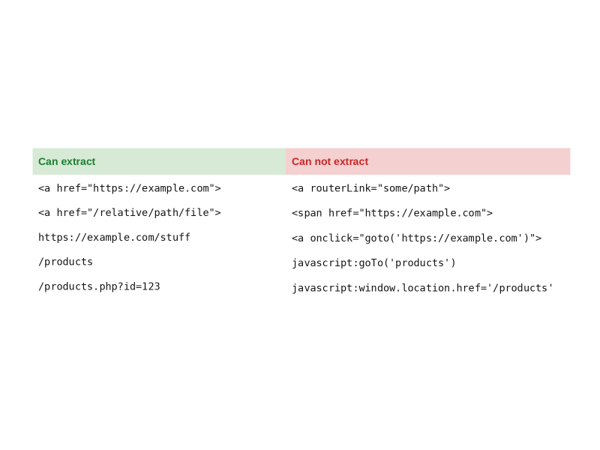
On websites made with JavaScript frameworks it is one of the first things to look at: if the menu or products are opened with an onclick or a routerLink, Google does not see them as links.
In the head, you can indicate rules for all robots or for a specific one. The ones you need to know:
Directive | What it does |
noindex | Does not index the page |
Nofollow | It doesn't follow links. At the page level it makes little sense; it has it more applied link by link |
none | Equals noindex plus nofollow |
nosnippet | Indexes the page, but without snippets or summaries in AI Overviews |
data-nosnippet | HTML attribute (not meta tag) that excludes only a portion of the content from the results |
max-snippet | Limits the length of the fragment, usually with a number of characters; -1 is unlimited |
max-image-preview | Set the size of the image: none, standard, or large. Large can help you gain visibility in Discover |
max-video-preview | Sets the maximum preview duration |
Notranslate | Avoid translation in results and Chrome. Unusual use |
noimageindex | It indexes the content, but not the images. Rare case |
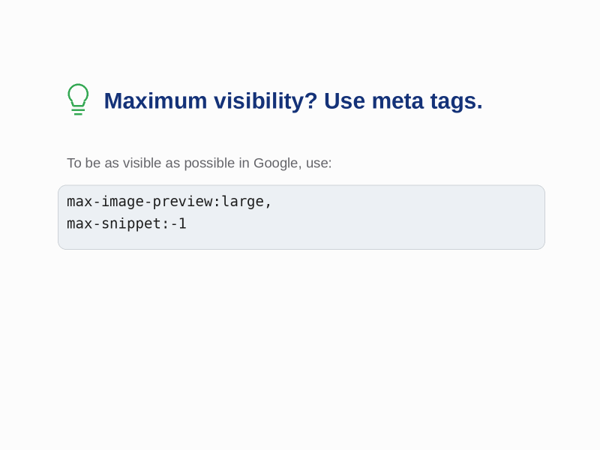
Throttling directives are a business decision: if we give the whole answer on the results page, the user has no reason to click. Still, for most websites the goal is maximum visibility, and the combination recommended by the presentation is this:
max-image-preview:large, max-snippet:-1
Two more clarifications. The robots.txt rules: if it blocks access to resources that we later want to enhance with robots meta tags, they are useless. And robot meta tags can be included using JavaScript, but it is unstable, especially in the face of changes. Better to avoid it.
Google has greatly improved the crawling and indexing of content in JavaScript, but it's still not perfect. What it wants is to understand what a person sees to know if the page responds, and it doesn't always succeed. The first time, almost never.
A page with JS goes through two queues: the HTML queue and then the rendering queue. The path is a bit longer, but if the content is well served, Google ends up picking it up. What you need to be clear about is that CSS and JS change how the page looks, and the result can be very different from bare HTML. If Google can't render well, most links and menus don't pick them up.
Whether your website is made with React, Vue, or Next.js, our guide to JavaScript-based SEO goes into more detail.
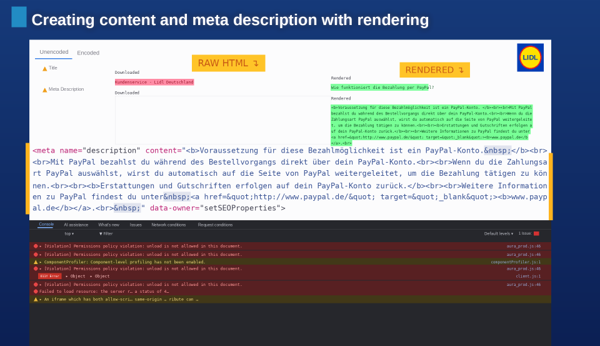
Case shown in the presentation: the title and meta description of the raw HTML do not match those of the rendering.
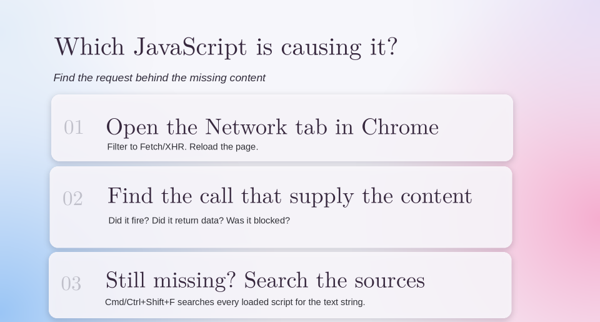
Method to find the request behind the missing content.
A detail to remember: the server can respond 200 and the JS content is broken, and then Google treats it as a soft 404. We tested it during the session with a page on our website: the URL was available to Google and only showed two console warnings for preloaded resources that were not used.
Google's systems collect content in JavaScript quite well, but other AI assistants still don't. That's why it's safest to serve it with SSR, i.e. server-side rendering. It's also worth asking whether AI bots can access all the content on the web, if you want them to.
The headless CMS is clean and secure, but the result is often not very readable by Google, even if the user sees it well. This can be partly compensated for by good structured data markup.
For AI-generated applications that then have to be delivered to be indexed, the presentation presented reframing with web fragments, which serve the app as isolated fragments within the page. It is still difficult to find standards and there is still a long way to go, so it is advisable to follow it from afar. WebMCP also came out, which is gaining importance in the age of management.
Google separates three areas when it reaches a page: header, navigation and main content. And it gives more and more weight to the third. That's why, many times, the title and description it shows in the results are not the ones we have given it in the header.
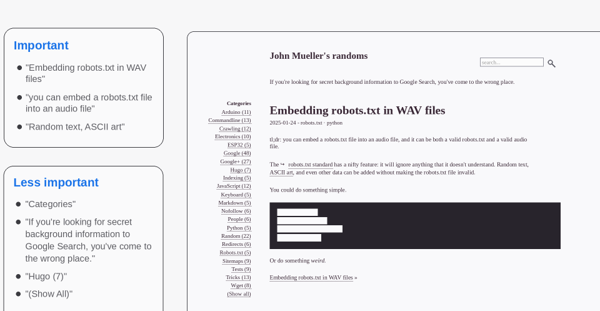
The consequence is practical: everything that is important has to go in the main content, but with criteria, without loading it up with everything. In the presentation they illustrated it with a post from a personal blog: the title and the text of the body are considered important, while the categories or the footer weigh less.
Main content versus secondary content, with a post from John Mueller's blog as an example.
What Google saves in the index is not the page as text either. It tokenizes the content: it separates each word, records its position and the area of the page where it is (header, centerpiece), and assigns each word to the URLs where it appears. This is how it tries to understand what the content is about and what format it is in. It has serious problems with languages that do not separate words with spaces.
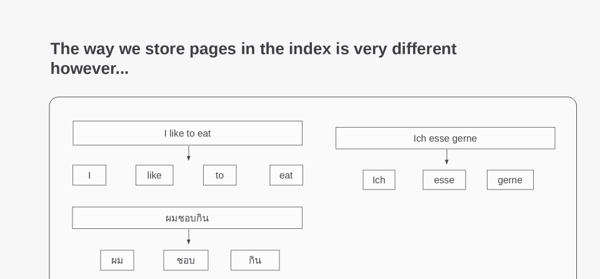
How words are separated when saving a page in the table of contents, and why languages without spaces complicate it.
This is not the chunking that AI models do. Google looks for context and does not need the content cut into fragments: it does not make sense to optimize it in blocks with Google in mind. For other AI models it can, for the time being.
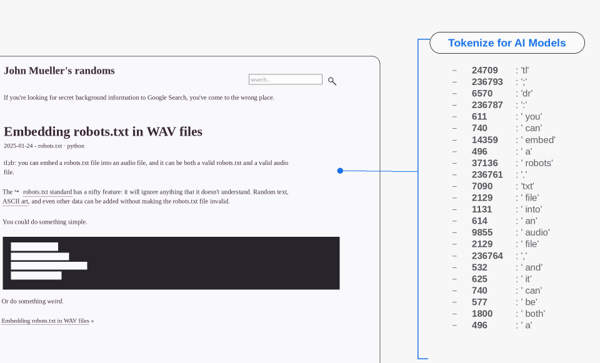
The tokenization that AI models do, which is not what Google stores in its index.
Google believes that the user doesn't want to see the same pages, and deduplicating also saves crawling time to read new pages. The process has three steps:
If the pages are the same, it canonicalizes. If they are in different languages, it consults the hreflang and respects it. It also saves the brands: in a rebranding, try to relate the old brand with the new one, so that whoever searches for the old one sees the new one. And the same criterion applies to content migrations.
You should always put the canonical rel, although Google checks it and doesn't always follow what we tell it. Discrepancies are checked in Search Console. Specifically:
When the canonical one that Google chooses is not ours, the cause is usually one of these:
The first thing to do is check that the page we want is indexable and that the HTML and rendering are correct. If none of this explains it, we can try redirecting the indexed URL to the good one.
With hreflang there is a nuance: on pages with the same language for many countries, Google ends up indexing one or a few URLs, no matter how much we mark them all. It is advisable to decide which is the main URL and work to make it the one that Google chooses.
The presentation closed with seven recommendations: use redirects in migrations, use HTTP response codes and do not block agents, review canonical rels, use hreflang to help locate, report strange canonicals in forums, make secure pages that work and keep canonical signals clear.
When Google already has the HTML, it does a feature extraction: it takes the general HTML, saves the images and videos separately and extracts the structured data. The current results page is full of modules that are not the ten blue links, and almost all of them come out of here.
It's easier, and cheaper, for Google to read structured data than to interpret visible content, as AI does. In addition, they allow you to give information that is not on the page and help bots focus on relevant content. They make the page eligible for rich results, for site and page functions (site name, breadcrumb), and for visibility in Discover. Several studies suggest that a good implementation can increase organic traffic.
How to work them:
For e-commerce there are new features: now you can send the loyalty program, the shipping policy and the product category.
Images are increasingly present in Search, Discover, and other surfaces. Google extracts them from HTML with the elements and . Those that are only referenced as CSS background-images are not reliably indexed. Better
; also picks them up, but it's best to avoid it.
Within the image, Google uses:
The rest of the attributes are ignored. It does read the words surrounding the image to get context. As good practices, it is advisable to include them in sitemaps, offer various formats and sizes, use AVIF and WebP whenever possible and seek the balance between quality and compression. We have more details in the post on SEO for images.
The weight of the video depends on the search intent. It appears in Search, YouTube, and Discover, now with previews and key moments. Video markup in HTML is very important. Best practices include:
Images and video have their own robots in Google, so they can be blocked separately with the robots.txt or managed with robots meta tags. For Discover, max-image-preview:large. And for AI-generated content, the recommendation is to review it before publishing it.
Google identifies the language by the content of the page, not by the URL or the hreflang. That's why you should avoid more than one language in the same URL. To find out which country a website is targeting, look at several factors:
Google doesn't vary the location of the crawler to detect different versions of the same page, and ignores geo.region location meta tags.
Multi-language SEO is gaining importance in the context of AI. You can translate with AI, but you need to check the quality of the translation. And often translating is not enough: there are legal, contextual, and cultural issues. Currency, offers and promotions, opinions and reviews, brand reputation, or product durability all weigh differently depending on the country. The presentation illustrated this with data from Think with Google on what buyers in the United States and Europe value, and with differences between countries such as Germany and France. Translating with AI may fall short for these types of factors, and will depend on the resources and risks of each project.
International SEO is not solved with translations, or even with a good hreflang:
To go deeper, we recommend Alizée Baudez's article on international SEO.
On how to structure the website by markets, we have a post dedicated to international SEO: domain, subdomain or folder.
Google only indexes a very small part of the pages it finds. It tries to keep the ones that give users the most satisfaction, and the selection is made at the end, when it has already analyzed content and signals. To decide this, you need to know if the content is reliable and relevant.
The essence hasn't changed: useful, original, well-structured, well-written content, with good metadata and schema. PageRank still exists, but it's been refined. The signs that stood out are four:
There are also negative signals that take a page out of the race: noindex, expired content (unavailable_after), soft 404, duplicates, and spam signals. User signals also count.
Two statuses of the page indexing report have a clear read:
Google tokenizes the content and tags each token with the area of the page where it is (for example, header or centerpiece). Then it builds a posting list: each word is associated with the URLs where it appears, tagged by format. This way it tries to understand what the content is about and what format it is in.
Location | Recommendation |
Quickly remove pages from search | Request deletion in Search Console |
Parameters we don't want to be crawled (variants, search filters) | Block them with robots.txt. Canonicals help index well, but they don't control crawling |
Google rewrites titles and we don't like it | Write better ones. Usually take the meta title or H1; if they are good, it will not take others (or yes) |
Out of stock product that will be back soon | 200 with schema out of stock, no 404 or redirect. Indicate on the page that it is not now and, if possible, offer preorder |
Self-referential canonical | Yes, just in case |
Disavow tool | No need |
Website deindexed by mistake that we want to recover quickly | Submit your top URLs through Search Console |
If you want to understand why Google rewrites titles, our post on how Google chooses page titles details it.
Content is still king, according to the paper, and it makes sense: the whole system described so far exists to decide what content is worth saving.
To decide what content is worth creating, a good source is Google Trends, which was also presented in the presentation. It has data from 2004 to a few minutes ago, combines text search, images and shopping, and serves both long-term trends and current topics. It is a good tool for marketing studies, for making SEO or SEM decisions and for presenting data to the client. It does not include Discover, because the user does not search there.
All of the above can be turned into an orderly review. This is the order we propose, from faster and with more impact to more work.
The official sources of each topic, to contrast what we have explained. All the documentation is in English.
And two technical references mentioned in the presentation: the History API (MDN) for URLs in single-page applications and Web Fragments for the delivery of AI-generated apps.
Indexing is a topic in which SEO and development have to be discussed. Many of the decisions that determine whether Google sees a website well (how it is rendered, how links are generated, what the server responds to) are development and are made before anyone thinks about SEO. At La Teva Web we work with our own team, without subcontracting, and that allows us to review these points with the person who builds the website.
If you want to know at which step of the journey the pages of your website are lost, write to us and we will do an indexability review. You can see how we work on SEO in our SEO agency in Barcelona and review the basics in the SEO Guide.

Hello! drop us a line


Indexing is no longer a formality: Google only stores a small portion of what it finds, and JavaScript, AI and changes in the SERP are making it harder.